BreakReminderThe break reminder app for Windows 10 & 11
A quiet tray app that reminds you to step away from the screen, then walks you through a short guided stretch video. Set the interval once and let it look after you.
One-time payment. No subscription. 14-day money-back guarantee.
 Now on the Microsoft Store
What it does
Built for people who sit at a desk all day and forget to move until something aches.
Reminds you on your schedule
Choose how often you want a break. BreakReminder sits in the system tray and nudges you when it's time.
Guided stretch videos
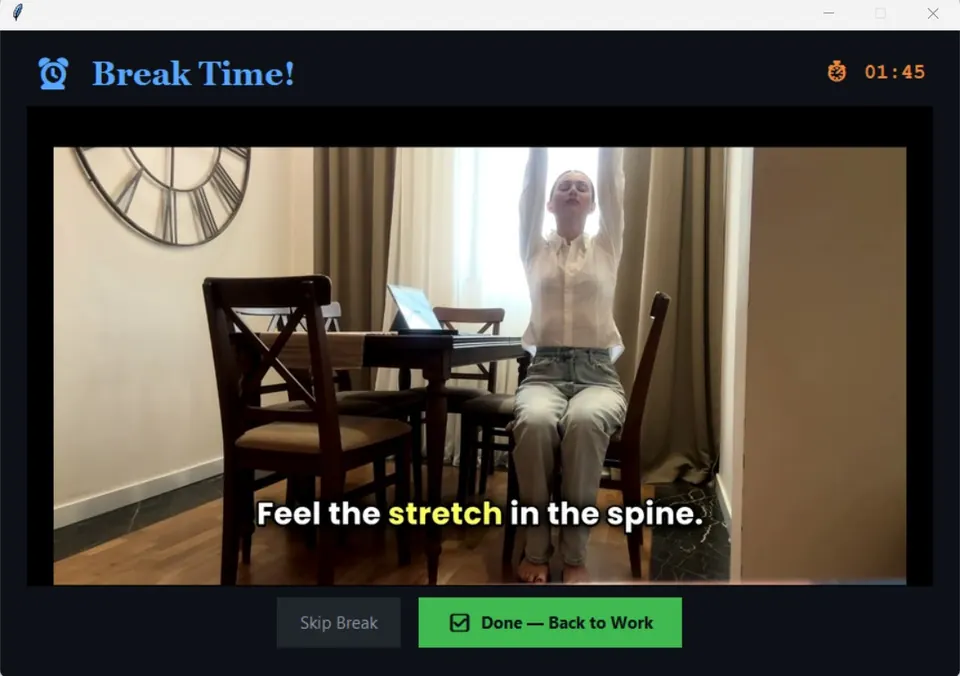
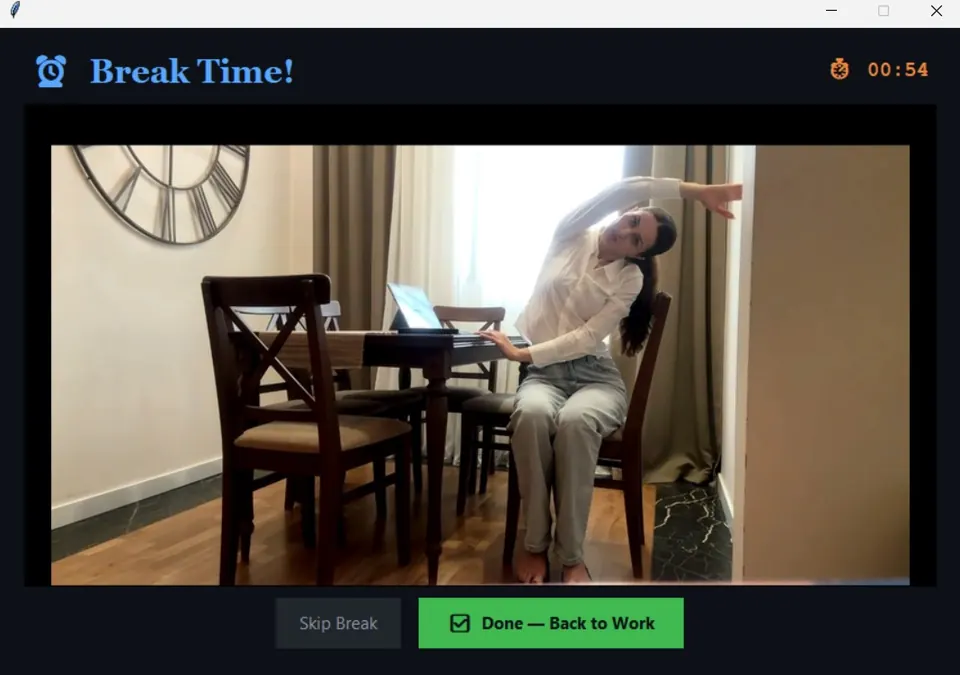
Each break plays a short follow-along video for your neck, shoulders, back or eyes, so you know exactly what to do.
Stays out of the way
No account, no browser tab, no clutter. It runs quietly in the background and only appears when a break is due.
See it in action
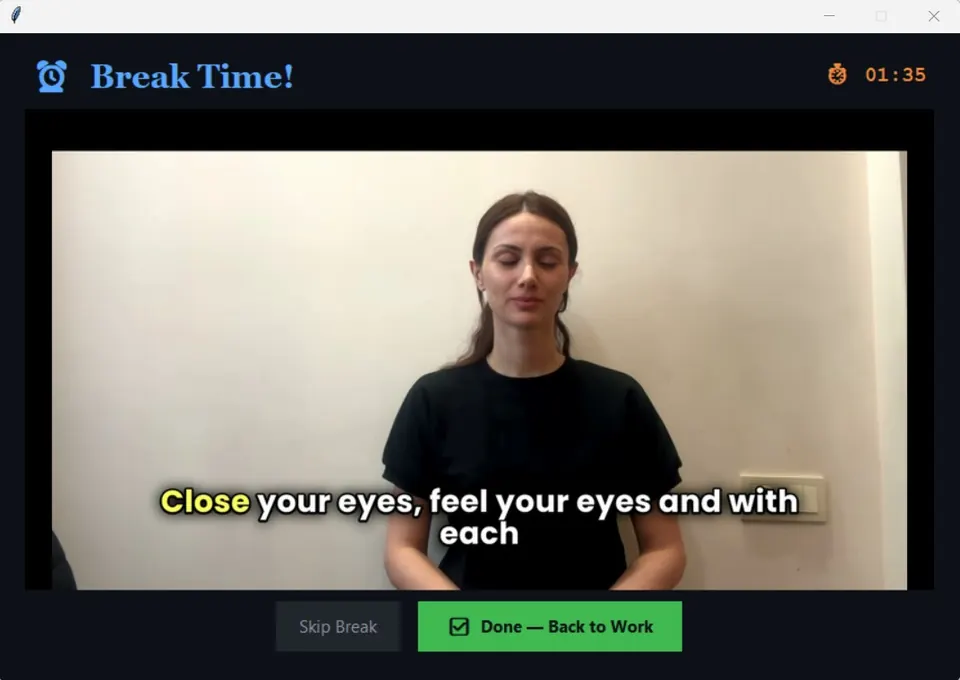
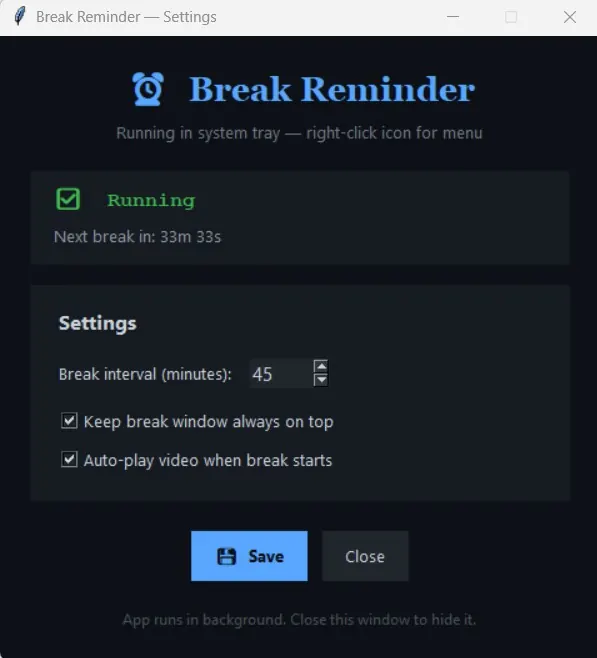
Real screens from the app. Each break opens a short captioned video you follow at your desk.
How it works
Download and install
Install BreakReminder from the Microsoft Store, or download the installer directly. The first 7 days are free with every feature included. No account or card needed.
Set your interval
Pick how often you want a break. BreakReminder takes it from there.
Keep it with a licence key
Like it? Buy a licence for $9. Your licence key arrives by email right after payment. Enter it in the app and it's yours to keep.
Why use a break reminder app?
Most people know they should get up regularly. The problem is remembering, and knowing what to do once you're up.
A timer tells you when. BreakReminder also shows you what.
A plain timer or a phone alarm beeps, you dismiss it, and you keep typing. BreakReminder opens a small break window with a short follow-along video and a countdown, so the break actually happens and takes one or two minutes, not ten.
| Basic timer or alarm | BreakReminder | |
|---|---|---|
| Reminds you at an interval | Yes | Yes, 1 to 240 minutes |
| Shows you what to do | No | Guided stretch video with captions |
| Break length | Up to you | Countdown you set, 10 seconds to 10 minutes |
| Skip when you're busy | Snooze | Skip with one click; the next break is scheduled |
| Where it lives | Phone or browser tab | Windows system tray, can start with Windows |
What's in the stretch breaks
Each break plays a short video of simple moves you can do in your chair or standing next to your desk:
- Neck and shoulders: gentle rolls and side stretches for the stiffness that builds up from looking at a screen.
- Upper and lower back: seated twists and side bends to undo hours of sitting.
- Wrists and hands: quick stretches for heavy keyboard and mouse users.
- Eyes: look-away and focus exercises in the spirit of the 20-20-20 rule.
On-screen captions explain each move, so you can follow along with the sound off in a shared office.
Who it's for
BreakReminder is made for anyone who spends long stretches at a Windows PC: developers, designers, writers, analysts, students and people working from home. If you've ever looked up from your screen and realised three hours had gone by, it's for you.
How often should you take a break?
A common rule of thumb is a short movement break every 30 to 60 minutes, plus regular eye breaks. BreakReminder lets you pick the interval that suits your work, and you can change it any time from the tray icon. Want to try a routine first? Our free desk stretch routine runs in your browser.
Comparing options? See the best break reminder apps for Windows, BreakReminder vs Stretchly, or what Windows 11 has built in.
One price. Yours to keep.
Pay once and use BreakReminder for as long as you like. If it isn't right for you, ask for a full refund within 14 days of purchase.
- Lifetime licence for up to 2 Windows PCs
- Guided stretch video library
- Custom break intervals, skip when you are busy
- Updates to the current version
- Email support at [email protected]
Secure checkout by Dodo Payments. Prices in USD; local taxes are calculated at checkout.
Questions
Does Windows 11 have a built-in break reminder?
Not really. The Windows Clock app has Focus sessions, which can time work periods with short breaks in between, but it doesn't remind you to stretch or show you what to do. BreakReminder runs in the tray all day and opens a guided stretch at the interval you choose.
Is there a stretch reminder app for Windows?
Yes. BreakReminder is a stretch reminder app for Windows 10 and 11. At each break it plays a 1–2 minute follow-along stretch video for your neck, shoulders, back, wrists or eyes, then schedules the next one.
Can I change how often it reminds me?
Yes. Set any interval from 1 to 240 minutes and a break length from 10 seconds to 10 minutes. You can also pause reminders, start a break now, or skip a break when you're in the middle of something.
Does it work offline?
Yes. The stretch videos are part of the app, so reminders and breaks work without an internet connection. It only goes online to activate your licence key and re-check it occasionally.
What happens after the 7-day trial?
BreakReminder asks for a licence key. Buy one for $9, enter the key from your receipt email, and keep using it. Nothing is charged automatically.
Can I use one licence on more than one PC?
Yes. Each licence activates on up to two Windows PCs. To move it to a new computer, click Deactivate in the app on the old one, or email us and we'll help.
What if it doesn't suit me?
Email [email protected] within 14 days of purchase and we'll refund you in full. See the refund policy.
Does it collect my data?
No. BreakReminder runs on your PC and doesn't track what you do. It only contacts our licensing provider to activate your key and re-check it about once a week. See the privacy policy.
Should I get it from the Microsoft Store or the website?
Either. It's the same app with the same 7-day free trial, and a licence key from intentlylabs.com works in both. The Store version installs and updates through the Microsoft Store; the website version uses a standard installer.
Which systems does it run on?
BreakReminder is a Windows desktop app. It isn't available for Mac or Linux yet.